
Merchant Signature Verification
Set up HMAC-SHA256 signature verification for authenticating merchant API requests.
Set up signature verification on the merchant side to authenticate API requests using HMAC-SHA256 signed headers.
Prerequisites
- Log in to the Merchant Back Office at
https://business.mifinity.com
Step 1: Generate a secret key
- In the Merchant Back Office, click Secret Keys in the side menu. The Secret Keys screen displays.
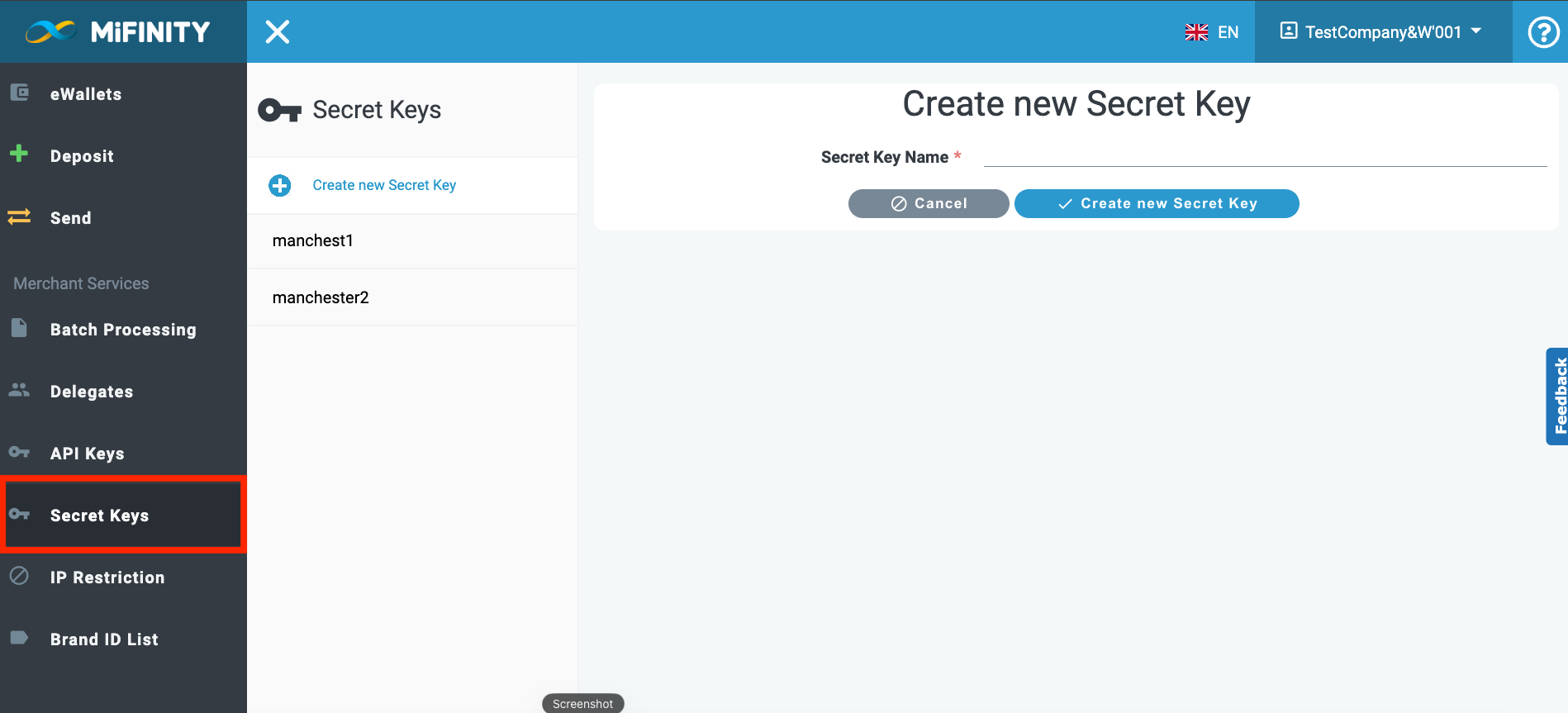
- Enter a name for the new key.
- Click Create a new Secret Key.
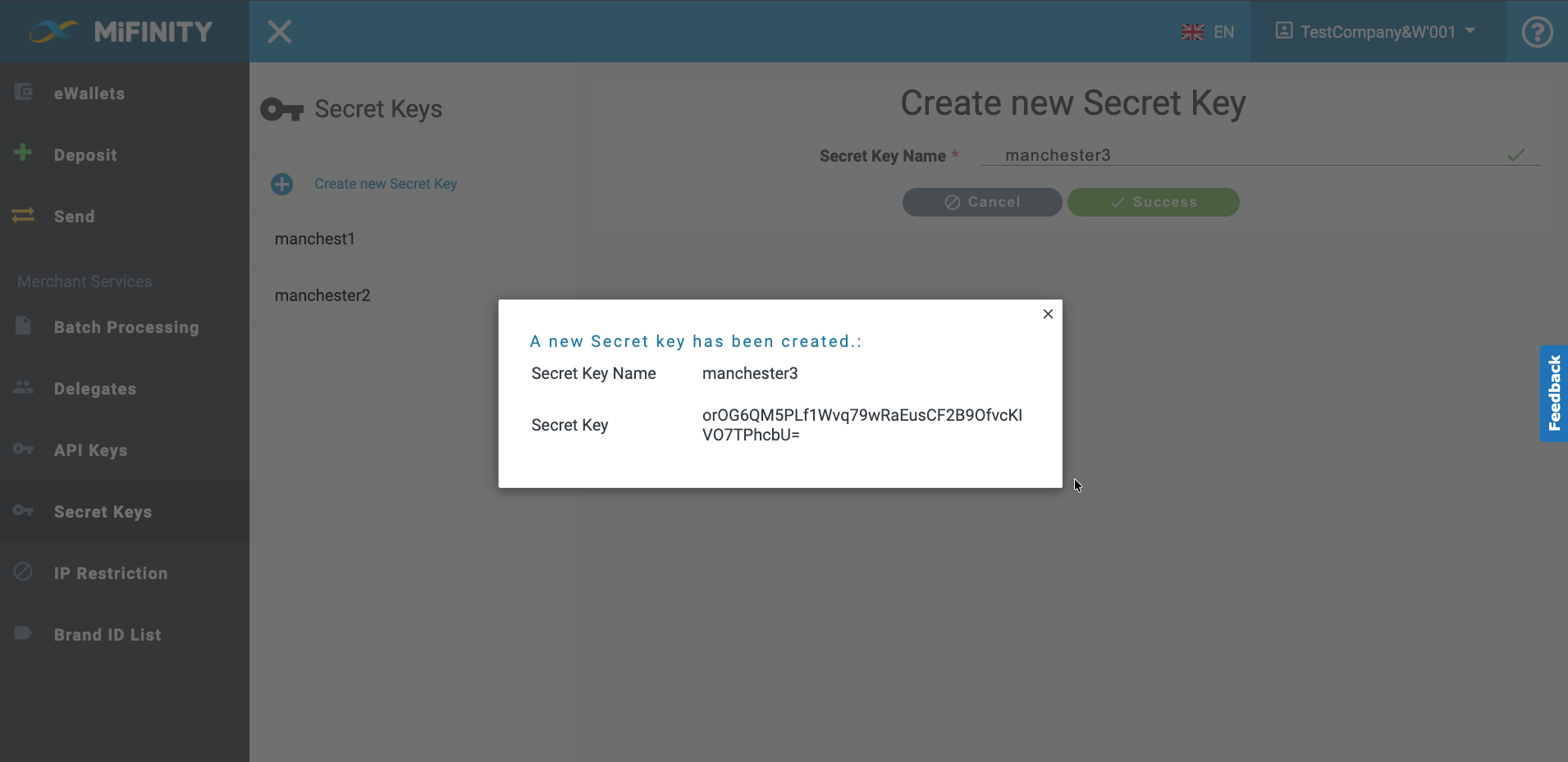
- Copy and save the generated secret key — you need it later to compute HMAC signatures for request verification.
The new key appears in your list of created keys.
Secret key rules:
- You can create multiple secret keys, but each must have a unique name.
- Only one secret key can be active at a time. New keys are created as inactive if an active key already exists.
- You cannot deactivate all keys if you have opted in to signature verification.
Step 2: Opt in to signature verification
Enable signature verification through the Merchant Back Office UI once it becomes available. Contact MiFinity support for current availability.
Step 3: Serialize the request body to plaintext
Before signing a request, serialize the JSON request body into a deterministic plaintext string using these rules:
| Rule | Description |
|---|---|
| JSON body | Parse to an object, then serialize with keys sorted alphabetically. |
| Concatenation | Append each key followed by its serialized value — no =, spaces, or quotes |
| Null values | Treat as empty string |
| Nested objects | Recursively serialize using the same rules (sorted keys, key + value) |
| Lists/arrays | Append only the serialized elements (no key for individual items) |
| Form data | Same approach: key-sorted, key + value concatenation |
Serialization example
JSON request body:
{
  "money": {
    "amount": 10,
    "currency": "BRL"
  },
  "description": "10 BRL PAB",
  "sourceAccount": "5001000000000003",
  "traceId": "8e621176-4bd8-48a4-a310-4cf7b10de0f5",
  "bankPayee": {
    "country": "BR",
    "currency": "BRL",
    "description": "bank payment description",
    "fields": {
      "ACCOUNT_NUMBER": "014580605766",
      "BRANCH_CODE": "12345",
      "PERSONAL_ID_NUMBER": "12345678901",
      "ACCOUNT_TYPE": "1",
      "CUSTOMER_NAME": "Customer Name",
      "BANK_NAME": "Name of Bank"
    }
  }
}
Serialized plaintext output:
bankPayeecountryBRcurrencyBRLdescriptionbank payment descriptionfieldsACCOUNT_NUMBER014580605766ACCOUNT_TYPE1BANK_NAMEName of BankBRANCH_CODE12345CUSTOMER_NAMECustomer NamePERSONAL_ID_NUMBER12345678901description10 BRL PABmoneyamount10currencyBRLsourceAccount5001000000000003traceId8e621176-4bd8-48a4-a310-4cf7b10de0f5Notice how top-level keys are sorted alphabetically (bankPayee, description, money, sourceAccount, traceId), and nested keys within each object are also sorted.
Step 4: Compute the HMAC signature
Build the X-MiFinity-Signature header using HMAC-SHA256. The signature is computed over a canonical string that includes an HMAC of the serialized request body.
Algorithm: HMAC-SHA256
Key: Your merchant secret key (UTF-8 encoded)
Output: Lowercase hex string (not Base64)
Canonical string format
METHOD|URL|TIMESTAMP|HASHED_PAYLOAD| Part | Description | Example |
|---|---|---|
METHOD | HTTP method (uppercase) | PUT |
URL | Request URI (path + query string if any) | /api/payments/pab |
TIMESTAMP | Value of the X-MiFinity-Timestamp header (milliseconds since Unix epoch) | 1771498513348 |
HASHED_PAYLOAD | HMAC-SHA256 of the serialized request body, as lowercase hex | 9f274d519bccc641... |
Signing process
- Serialize the request body to plaintext (see Step 3).
- Compute
HASHED_PAYLOAD:HASHED_PAYLOAD = HMAC-SHA256(secretKey, serializedRequestBody) → lowercase hex - Get the timestamp: Capture the current time in milliseconds (Unix epoch). Use this same value for the
X-MiFinity-Timestampheader. - Build the canonical string:
canonical = METHOD + "|" + URL + "|" + TIMESTAMP + "|" + HASHED_PAYLOAD - Compute the final signature:
X-MiFinity-Signature = HMAC-SHA256(secretKey, canonical) → lowercase hex
Step 5: Send the required headers
Include these headers with every signed API request:
| Header | Description |
|---|---|
key | Your API key. Required for the server to run signature verification. |
X-MiFinity-Timestamp | Current timestamp in milliseconds since Unix epoch (e.g., 1771498513348). |
X-MiFinity-Signature | The HMAC-SHA256 hex string computed in Step 4. |
api-version | API version number (e.g., 1). |
Updated 7 months ago